LDIF Backup
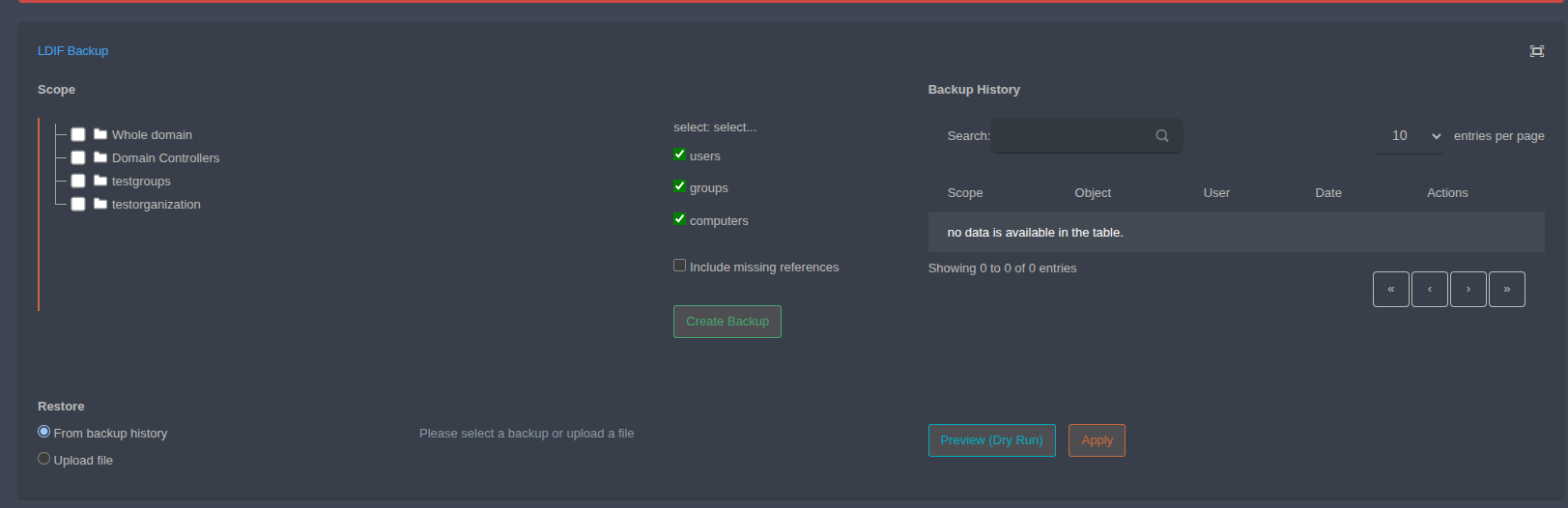
The LDIF Backup screen lets you back up user, group and computer objects in the selected scope in LDIF format and restore these backups later.
Creating a Backup
Scope: Select the area to back up from the tree. Choose Whole domain for the entire domain, or select
Domain Controllersor your organizational units individually.Object types: Use the users, groups and computers checkboxes to choose which object types are included in the backup.
Include missing references: When checked, references of the selected objects that fall outside the scope are also included in the backup.
Create Backup: Creates the backup based on your selections.
Backup History
The Backup History table lists backups with their Scope, Object, the User who created them and the Date. Operations on backups are available in the Actions column. Use the search field above the table to filter entries.
Restore
From backup history: Restores from a backup selected in the backup history.
Upload file: Restores by uploading a previously downloaded LDIF file.
Preview (Dry Run): Previews the restore without making changes to the directory.
Apply: Applies the restore.
Tip
It is recommended to check the changes with Preview (Dry Run) before applying a restore.