RODC Preload
Important
The RODC Preload screen is displayed only on domain controllers configured as an RODC (Read-Only Domain Controller). It is not available on writable domain controllers.
For security reasons, RODCs do not store user and computer passwords by default; passwords are retrieved from a writable domain controller and cached during the first authentication. With the RODC Preload screen you can preload the password of a user or computer, or the passwords of all user and computer members of a group, into the RODC. This allows users to log on even when, for example, a branch office loses connectivity to the writable domain controller.
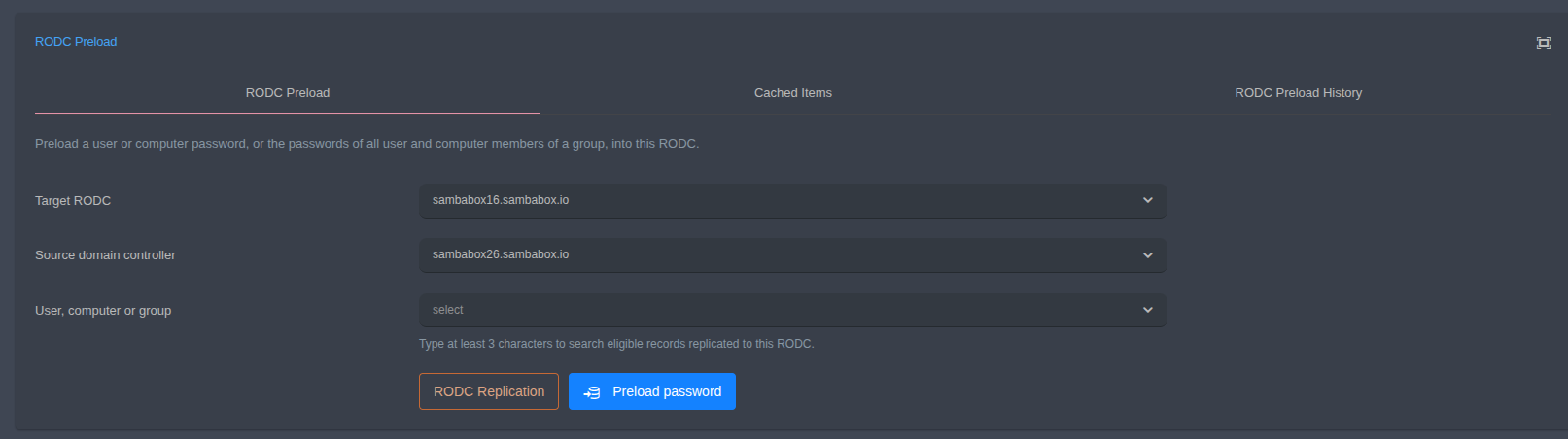
The screen contains three tabs:
RODC Preload: The tab where passwords are preloaded.
Target RODC: The RODC into which the passwords will be loaded.
Source domain controller: The writable domain controller from which the passwords are retrieved.
User, computer or group: The object whose password will be loaded. Type at least 3 characters to search; only eligible records replicated to this RODC are listed.
RODC Replication: Starts replication for the RODC.
Preload password: Loads the selected object’s password into the RODC.
Cached Items: Lists the users and computers whose passwords are cached on the RODC.
RODC Preload History: Shows the history of preload operations.
Note
To preload an object’s password, the object must be among the accounts allowed in the RODC’s Password Replication Policy.